My Cool Playdate Mech RPG

Hi everyone! I’ve been putting off sharing anything about the game until it was Visually Presentable, but finally accepted this is still years away. So let’s document the progress as it happens. Alright, let me channel my best nintendo direct impression:

My Cool Playdate Mech RPG (working title) is a game of Strategy, Romance, and Giant Robots for the Panic Playdate video game console. Set in a sci-fi world of space feudalism, where great Noble Houses wage civil war over scraps of imperial periphery, create your own Mech Pilot and assemble a ragtag team of Nobles, Mercenaries, Pirates, and more! Customize your fleet of Mechs and take it into tactical, turn-based battles, both planet-side and in outer space. Strengthen bonds between your squadmates by having them fight side-by-side on the battlefield, and in the off-time get to know them through visual-novel style story scenes. Forge frienships, rivalries, and maybe something more? Mount your Mechs and shape the fate of the galaxy in My Cool Playdate Mech RPG (working title), coming to Panic Playdate at uhhhhh some point. Like 2029 or something

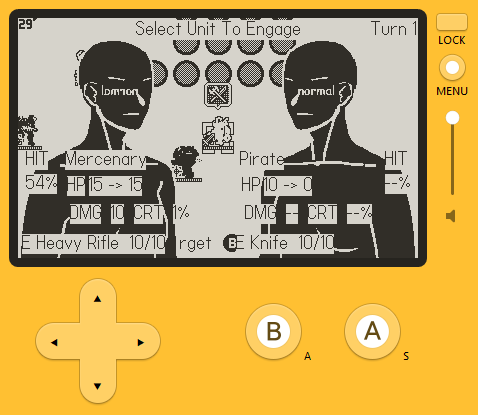
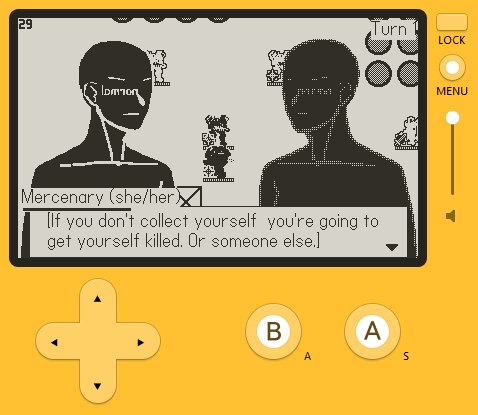
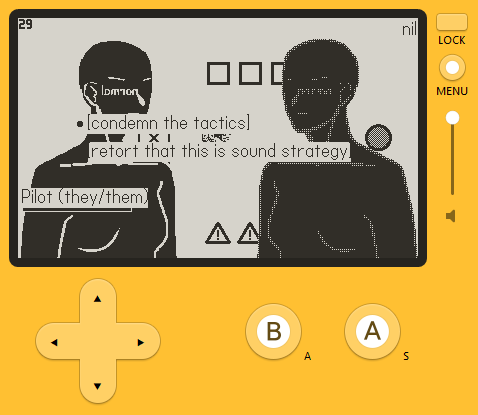
Screenshots (literally all of the visuals are currently placeholder)
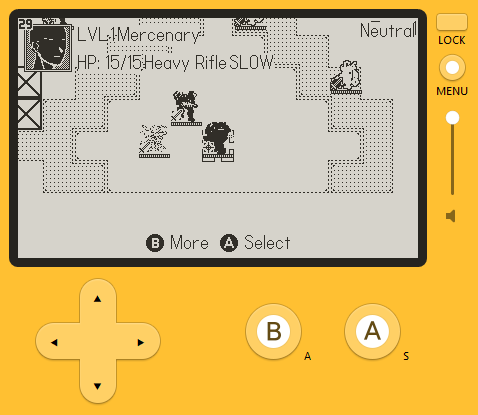
select unit

engagement preview

dialogue

options

Ok enough of that bit. MCPMRPG(wt) is an SRPG, chiefly inspired by Fire Emblem and Lancer. It has character creation, grid-based tactical combat, build-crafting through equipment, and cross-unit relationships (both player-companion and companion-companion). It will have dialogue options for role-playing purposes, but most likely no significant branching in the story.

I’ve started on this project in May of 2024. Been wanting to make something for the Playdate since basically it’s announcement, and wanted to make something mech-related, and playing Fire Emblem Fates at the time I thought “Here is a simple and exciting idea – Fire Emblem + Mechs! It’s just a series of stand-alone maps with straight-forward turn-based mechanics, how long could it possibly take? Like 2-3 years tops?”. Turns out, unfortunately, a game even of this modest complexity still takes one person working part-time like 5-6 years (and that’s still an optimistic number at this point).

By the end of 2024 I’ve had both combat and dialogue systems pretty much working. And since then I’ve been stuck making everything else around it! Menus, turns out, take a really long time.

List of what’s currenty in the game:

  • Main menu
    • With the ‘Press Any Button’ message! Surprisingly satisfying to implement one yourself, makes me think about video game conventions, how arbitrary they actually are, and yet how we continue re-create and perpetuate them. Every ‘Press Any Button’ screen in every game before did not magically appear on its own. A human looked at other games, thought “we need one too”, and diligantly re-crafted it from scratch in the image of those other games. I kinda love that
  • Save/load menu
    • With support for multiple characters, manual saves, and separate categories of auto-saves (before starting mission, before deploying to combat, start of each turn)
  • Basic character creation
    • Currently you can enter your name, mech name, and choose both third- and first-person pronouns. A handy preview demonstrates an example sentence to show how those will look in-game. Editing your character’s visuals will happen at some point.
  • Mission selection screen
    • Currently just a list of names of available missions. At some point I plan to make it more visually interesting
  • Mech equipment management menu
    • Unit can equip a number of weapons, Systems (passive-ish bonuses, aka perks aka feats etc.), and a Frame (determines stats + can come with pre-installed Systems)
  • Relationship menu
    • Check relationship levels and access unlocked scenes
  • Combat
    • So many things implemented here, attacking, aiding, pathfinding, status effects, enemy ai, VFXs, etc.
  • Cutscenes
    • I’ve ported my dialogue system from Godot to Playdate, and so can use my Dialogue Editor to write branching dialogues. Additionally I’ve implemented a veeery simple scripting language to direct simple cutscenes (move units around, move camera around, etc) and integrated it into the dialogue system.

List of things curiously still missing :

  • All of the art
  • All of the sound
  • All of the writing

Whoops! Turns out I made the rookie mistake of getitng stuck in pre-production hell and am yet to start actually making the actual game. All the visuals including UI are currently placeholder. Current mech sprites are by blobertson. I did technically have some writing done – world-building and a rough outline, but those hardly count.

Thank you for reading! I have several posts planned about technical and design aspects that I found neat, and will try to log my future progress as it happens.
Since you’ve also talked about the dialogue editor here I’d be interested to read about this process. How much of the original work was stuck in gdscript/c# etc? Does the work of “porting” mostly just mean implementing something that can parse files?

Also, importantly: what do you use the crank for in this?

Yay, RPG! How did you program the enemy AI?

I’m also here to ask how the crank is going to be incorporated!

I very much hear what you’re saying in terms of “my whole life is menus”, it feels like UI work is never-ending. I try to remind myself that the way players interact with the game UI kind of IS the whole game, particularly if you’re making a more menu-driven game like you’ve described.

Anyway, I’m looking forward to seeing how your work progresses!

Thank you for your intereset!

For the sake of porting, the dialogue system is three parts - the editor, the files it produces, and the runtime logic that works with those files. Editor logic remained basically untouched. Runtime-logic was ported over a long weekend of copy-pasting classes one by one from GDScript to Lua and adjusting the syntax lmao. As for files, I really did not want to parse Godot’s .tres format. So for the editor I implemented a JSON exporter, and then in Lua I parse those .json files into runtime data. The current workflow is: I open a Godot project (since i still haven’t had the time to fully sever my editor from it), work with “source” .tres files in my editor, and upon saving they are automatically exported as .json into a corresponding folder in my Lua project. Not the cleanest, but it gets the job done.

Enemy AI is nothing fancy, enemies don’t coordinate with each other nor think several moves ahead. I’ve implemented essentially a simple utility-based AI. There are two verbs - attack and aid. On its turn, unit looks at every target it could attack and every position it could do so from, same with aid. Then for each position it evaluates a scoring function. For example attacking score depends on how much health attacked unit will have left, whether you get counter attacked or not, how far you need to move to get there, etc. Then it just moves to the highest-scoring position and performs that action on target unit.

Game design-wise I’d say this is good enough. State of the board changes too dramatically turn-to-turn for multi-turn planning to be meaningful. And some complicated enemy coordination is not communicated to the player, so would remain barely noticible anyway. At most I’m considering a heuristic where units with buff/debuff abilities should act first, and regular attackers should act second.

Regarding the crank, currently there are no plans for it. I find it best suited for inputs that require analog precision, which is simply not a thing in a very discrete turn-grid-based game. I’ve considered it for maybe radial menus, or as a mini-game to charge up powerful attacks, but ultimately these all seem like gimmicks. Not particularly additive to the experience and could become tiresome, solutions in search of a problem.

Personally, I was never especially enthusiastic about the crank. Playdate instantly enamored me with its 1-bit screen, form-factor, and independent nature, but the crank, while fine, fun even, is just not useful for the types of games that I like and want to make.

I think you could make some truly creative crank-based attack-charging mini games if you wanted too, like in Paper Mario. But if that’s not the kind of game you want to make, then that’s totally fair!

I find games on Nintendo platforms to be frequently annoying because they try to find a use for Nintendo’s goofy hardware, whether it makes sense or not, and it tends to detract from the game. I see the crank as a similar thing, but even more weirdly specific. I make pretty straightforward games and unusual modes of input do not interest me, so I doubt I’d ever have a use for it.

Here comes the first of the posts I want to write about technical aspects of the game. It’s probably not anything revolutionary, but these approaches were novel and useful to me, so maybe they’ll be interesting to others.

Of Scenes And States

Playdate provides two SDKs - for C and Lua programming languages. Most of the game is written in Lua, with a little bit of C for more demanding things like pathfinding. While the SDKs are fairly fleshed out, they are still closer to a framework than an engine. I had to implement a ton of fundamental things myself, and so could shape those fundamentals to my liking.

Engines I’ve worked with before structure games around Scenes (aka Levels aka Rooms) and Actors (aka Game Objects aka Nodes). Actors hold logic and data, Scenes hold Actors and manage their lifecycle.

My issue with this approach is you often need “higher-level” logic that isn’t tied to an any one actor in the world. You may need to store meta-progression, or, say, flow of combat – whose turn is it, what part of the turn is it, etc. You have to either resort to an invisible dummy Actor which holds that data and logic, and now needs to be carefully migrated between scenes. Or global variables which exist outside the Actor/Scene system all together, and need their lifecycle managed separately. Both of these solutions seem a lot like hacks, even though this is a very basic need for most games.

Additionally, when I implement such “meta” logic, like the combat flow example, it often turns into one huge bloated mess of a class. There are no built-in affordances that would push me to break this logic up into smaller independant pieces.

Playdate SDK doesn’t come with any scene or actor management, so instead I chose to build everything around States and State Machines. I wanted to put primary focus on the over-arching flow and structure of the game, unlike the Actor/Scene paradigm that centers individual pieces of content.

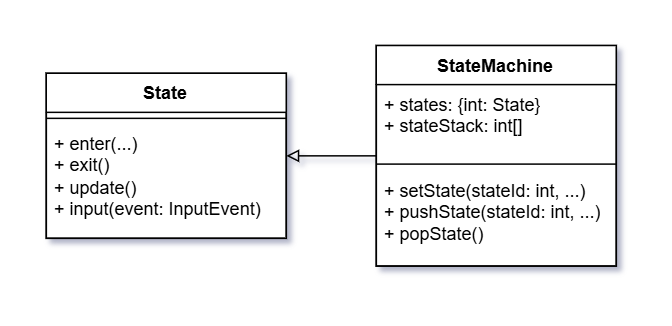
Here’s how it looks like in my implementation:

state machine class diagram

State class sets up whatever it needs in enter(), performs logic in update() and input(), and cleans up in exit().

State Machine class stores State-s and has one of them be active. Importantly, it inherits from State, meaning that any State could potentially also be a State Machine with its own sub-States.

Instead of storing current state id as a singular int field, I use a stack of int-s (learned while writing this post that’s called a Pushdown Automaton). State on the top of the stack is treated as the current active one. setState() calls exit() for previous active state, replaces the top of the stack, and calls enter() for new active state. pushState() in my implementation allows you to activate another state “on top” of the previous one. New state is pushed onto the top of the stack and enter()-ed. Previous state also remains enter()-ed, but without update() and input() being called it becomes effectively paused. Then popState() calls exit() and pops the top of the stack, making previous state “unpaused”.

As a use example, say you want to open the settings menu during combat. You simply push SettingsState on top of CombatState. CombatState remains in memory and in the background of the screen, but CombatState.update() stops being called; menu is drawn on top via SettingsState.enter(), and all inputs are now directed to SettingsState.input(). Then on B button press you call popState() – SettingsState.exit() erases menu from the screen, and CombatState once again becomes active, exactly as you left it. The stack is additionally useful because SettingsState does not need to know what it is opened on top of, so we can reuse same code for opening settings from for example both main menu and mid combat.

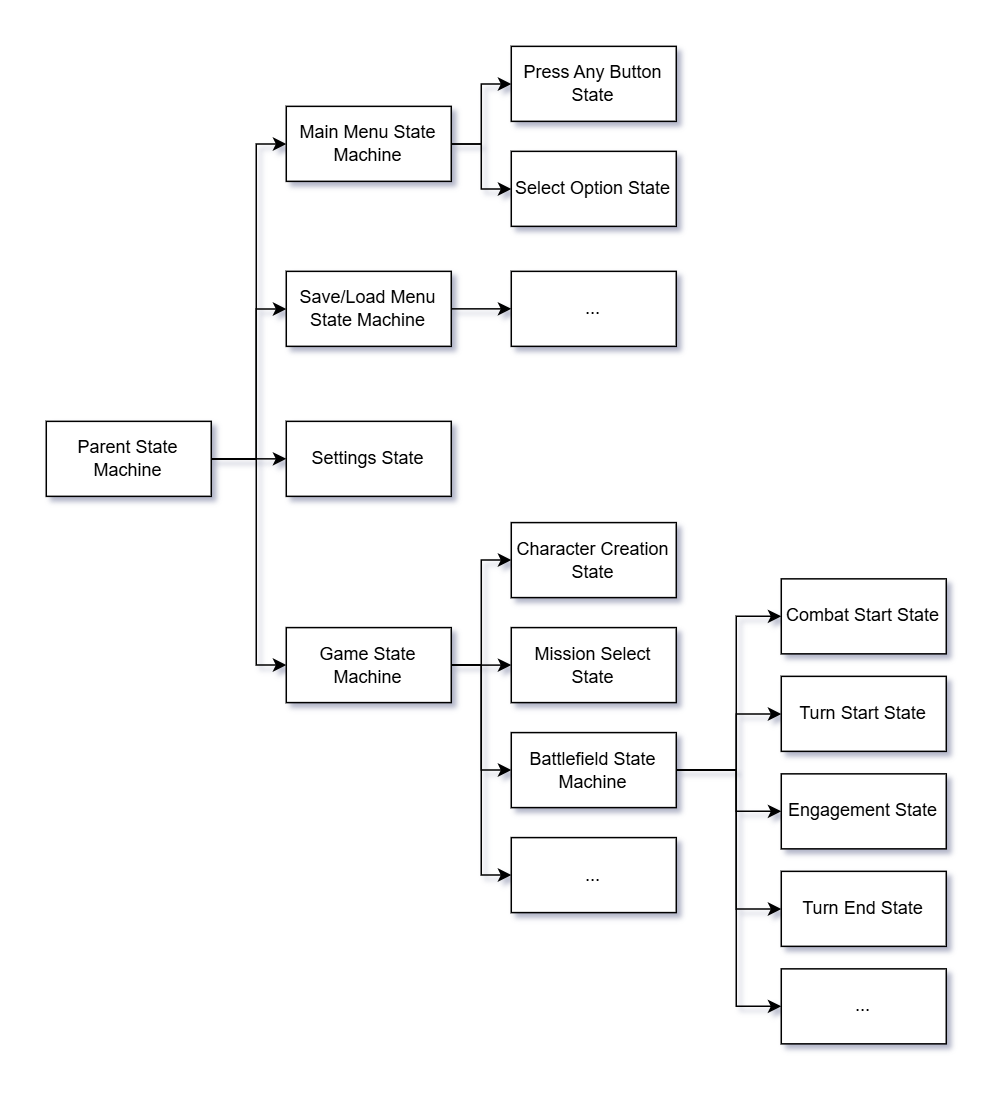
Game States

Here is roughly how my game is organized into States. Parent State Machine interacts directly with the SDK for things like input listening and updating every frame. Settings and Save/Load menus can be opened from both main menu and in-game, so they exist on the same level as those, and can be stacked on top by calling ParentStateMachine.pushState(). Playthrough-related data, like your custom player character, recruited units, narrative choices, etc., are stored within Game State Machine and not just floating in the aether of global variables.

I’ve previously wrote about what I call ‘top-down’ vs ‘bottom-up’ architectures. I would classify this State-centric approach as top-down, and Actor/Scene-centric approach as bottom-up.

In State-centric architecture, current State is at the top, and it is “smart”: it decides what objects to spawn, centrally processes all user inputs, tells those objects what to do based on inputs and State’s internal logic, and moves game to different states. This result in a very rigid, but therefore very predictable, stable, easy to track game flow.

Meanwhile, Actor/Scene approach encourages having many “smart” Actors at the bottom, each independantly listening for user input, and acting according to their attached logic. Scene is above Actors but is “dumb” – it spawns required Actors but has no further logic of its own. This results into a chaotic unpredictable web of interactions, unstable and hard to track. Such approach can produce the coveted Emergent Gameplay, but you don’t necessarily want emergent gameplay in, say, your menu flow.

For this menu-driven turn-based game, top-down State-centric architecture was absolutely the right decision. Code is easy to write and debug. The any-state-could-be-a-state-machine approach makes it very intuitive to break up larger logic into increasingly granular chunks. At my day job, we use the Actor/Scene approach, and every system listens to inputs independetly. And it is a never-ending nightmare of overlapping inputs, different priorities, listeners not unsubsubscribing at the right time, etc etc. Processing all inputs centrally within current state prevents all of these headaches. You program the exact subset of available inputs, and exactly what each input does.

For real-time action games, or a complex multi-window UI like in MMOs, this State-Machines-all-the-way-down model wouldn’t work very well, you’d need a more bottom-up approach with independent Actors. But those usually still exist within a simpler over-arching program flow, so I would advocate for at least a mix of the two. State Machines for overaching program flow, simple UIs, input handling; independent Actors below them for complex interactions with lots of moving parts.

Various notes about the save system.

Debug using saves

Universally good advice everybody gives is to implement the save system as early as you can. The later you do this, the more of a technical nightmare it will become. My two cents here is a working save-load system is increadibly useful for debugging, so having it early helps there too. I had the game auto-save after any unit action, so if something broke I could instantly reload and debug what went wrong. This was both very convinient and forced me to always maintain the save system in perfect working order. If a bug occurs, but isn’t reproduced after a reload, something needs fixing in the save system.

Big thing to pay attention to here is determinism – your random number generator, order in which various entities are proccessed (iterating over dictionaries will get you!). Lua doesn’t give much control over its RNG, so I’ve implemented my own simple one (an LCG) and save its current seed. Some games have a setting to preserve or re-generate the seed after reload, to let players save scum after missed attacks. I may add a setting like that later, but currently everything is entirely deterministic from start to finish, no RNG manipulation needed to speedrun!

Save only what is needed

I’m trying to always consider what will happen if I want to change something after release. Breaking players’ save files is a huge no-no, and migrating saves from older to newer versions is often a laborious buggy mess. So it’s important to re-init as much as possible from game data, and load from save only the bare minimum I can’t restore from somewhere else. This seems obvious, but several times I’ve been lured into the trap of saving something whole-cloth because it was quicker and simpler.

For example, some Systems and status effects can give you temporary weapons. You can equip a Hacking Module and get an [Overheat:Protocol]. On load, you need to know what weapons you have, and the number of uses each weapon has left. Initially, I simply saved and loaded the entire array of tmp weapons, same as I do for regularly installable weapons. It works just fine now, but what if after release I decide “Hey, Hacking Module is kinda weak, should it give a different stronger protocol instead? Or two different protocols?” Then I’m skrewed! Anybody who already has Hacking Module equipped will load the game post-patch to find their old [Overheat:Protocol] and nothing else, until they re-equip the System. I also can’t simply not save anything about tmp weapons, because I need to correctly restore number of uses left. So I need to:

  1. save equipped tmp weapons with their respective uses left;
  2. on reload, allow equipped Systems to re-fill tmp weapons array based on game data;
  3. compare saved tmp weapons with current tmp weapons, and apply number of uses for matching ones.

It’s more work, but I need to resist the siren song of cutting corners.

Store save's metadata separately

When your save file size grows, and you need to show a list of dozens of save files to the player, it’s useful to break up the save file into two parts – light-weight metadata header and chunky rest-of-it body. Metadata contains only what’s shown to the player in the list – date, character name, location, play time, a screenshot. You show the list by quickly reading metadata of every save file, and only read the body for the file player selects to load.

A smart solution is to structure your save file to contain metadata in the first fixed number of bytes and only read that. A simple solution is to just have two separate files for each save. And if two files is good enough for Dragon Age: Origins, it’s good enough for me!

Save Profiles

Some games have one long list of every save file for every character mixed together with no differentiation, and it can get messy really quickly. I am still haunted by a memory of accidentally overwriting my sibling’s save file by clicking on the wrong save slot.

Having looked at various RPGs for reference, I divided saves for different character into Profiles. Each Profile has its own folder with save files and a Profile Metadata file, containing creation time, difficulty settings, etc.

Save Categories

Initially I had a simple hard-coded distinction between Manual and Auto saves. Then I wanted to introduce auto-saving at various places – before mission start, on mission start, on start of every turn, etc. And I wanted both to have a limited number of auto-save slots, and for different types of auto-saves to not overwrite each other. No matter how many turns deep into a mission you get, you should always be able to reload to the start of it.

So I’ve introduced a concept of Save Categories. Profile contains multiple categories – Manual, Before Mission, Mission Start, Turn Start, etc. Each category has its own fixed number of available save slots (except for Manual, but I may need to introduce a hard limit at some point). When the limit is reached, oldest save in the Category will get overwritten.

"Delete All Saves" button in main menu

This one is just very useful during development when file format is changing constantly and old saves become invalid. Bonus points if you can access this button before the game has a chance to read any save files and crash (I do not yet get bonus points).

Technical details

The actual code of saving and loading is nothing clever. Savable enitities have pack() and unpack() functions. pack() returns a JSON-serializable table. unpack(saveData) works differently depending on what is more convinient for a specific class – either returns a new instance of an object, or applies saveData to an already existing instance. Both of these functions I implement by hand for every class that has them. A bit of a chore, but forces me to always consider what and how I save, as outlined earlier.

GameSession class stores various things like narrative variables, roster of units, inventory of items, etc. GameSession:pack() effectively packs the entire game: calls pack() for its various fields, saves whether we are in combat or on the world map, calls Battlefield:pack() if we are in combat. It also generates a JSON-serializable table of metadata. Then SaveProfile:save(categoryId, saveData, metaData) writes these two tables to disk as JSON files at the approproate path. Finally, I can read the JSON back in, apply it via GameSession:unpack(), and move the game to a correct state.

Loading screen

Finally, a little about the loading screen. Loading Screen is not its own separate State in my State Machine architecture, it’s something that exists on top to paper over transitions from State A to State B that take too long.

Playdate games are single-threaded, so I:

  1. start a corouting which will set the State Machine into target State;
  2. draw a sprite over the entire screen and ask my input system to not send any input events;
  3. manually yield the coroutine at various points of setting things up, and resume it on the next frame;
  4. when target State is fully set up, remove the sprite and unblock input.

Friendship ended with Property Inspector, Now CSV Table is my best friend

This one ended up being a bit of a rant, but I have Strong Feelings.

Another area that needed figuring out without a pre-existing engine was creation and editing of game data – various configurable assets like items, unit stats, perks, abilities, etc. Mainstream engines have largely adopted the model of:

  • creating a separate file per object;
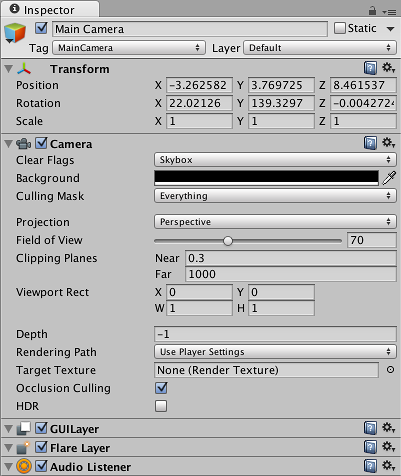
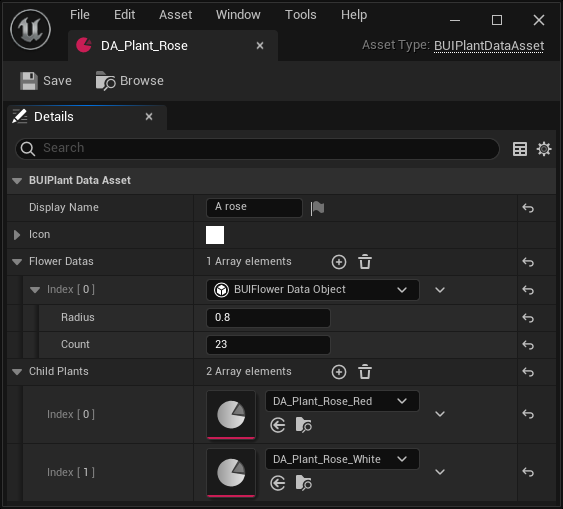
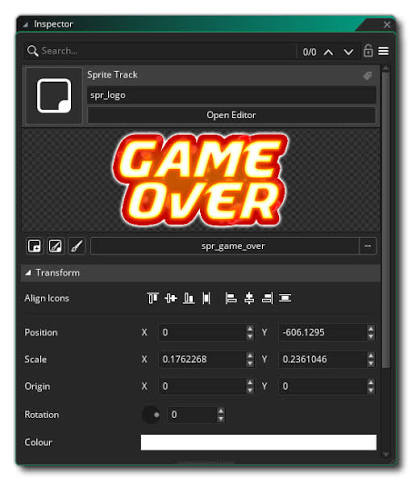
  • editing it in an Inspector, with support for in-place editing of nested objects;
  • having an object inheritance hierarchy, with an ability for child objects to inherit or override values for parent fields.
Examples of Inspectors in various engines

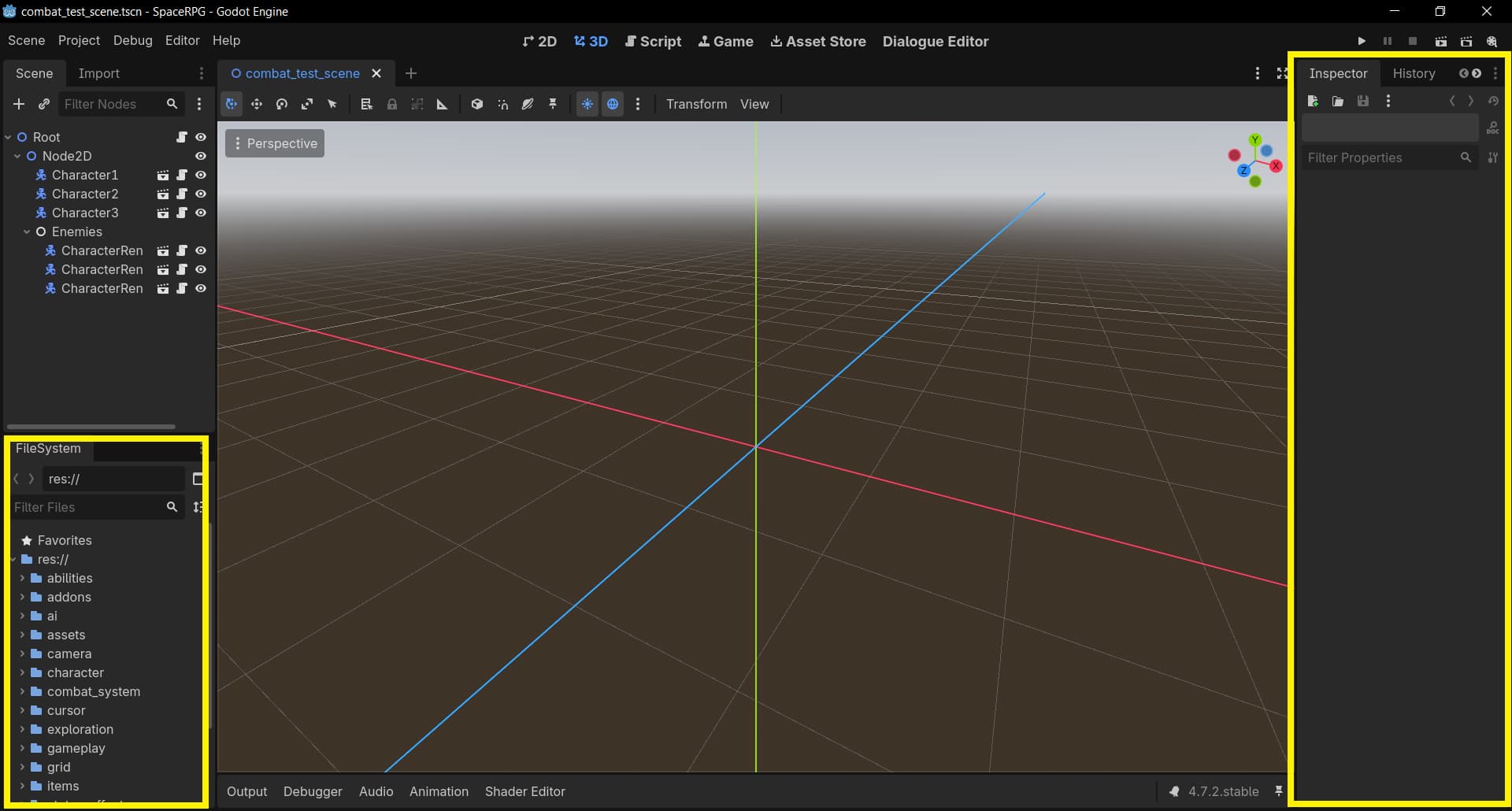
godot inspector unity inspector unreal inspector game maker inspector

Early in the project I’ve only really had experience with Godot and Unity, so this approach was the only one I was aware of. Initial plan was to do replicate it with JSON files – individual file per object, edit either raw text or find/make some sort of GUI.

Luckily, at the time I watched Mark Darrah’s video where he talks highly about the 2DA file format they’ve used at BioWare starting with Baldur’s Gate 1 (1998) all the way until Dragon Age 2 (2011). And it’s essentially just a spreadsheet! I’ve heard that “work of a game designer involves a lot of spreadsheets”, but always assumed people meant it was about formulas, balancing economies, stuff like that. Not about literally storing game data as a spreadsheet.

I’d already added CSV file support for localization purposes, so it was fairly quick to try out this approach. And wow it turned out to be so much better than editing files one by one with an Inspector. Like, how has nobody told me this was an option before?


Let’s compare these two approaches. We’ll use Godot as an example of the Inspector model. By default, we’ve got a tiny FileSystem window in the bottom-left corner, and the tall narrow Inspector window on the right.

Let’s imagine a couple scenarios:

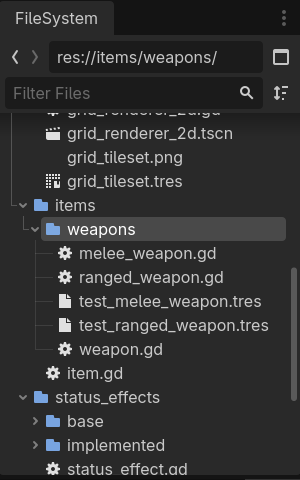
  1. Say we want to take a look at what Weapons we have in our game. We need to use the FileSystem to navigate to the correct folder (sure hope you put all your weapons in one folder!) to see our desired list of Weapon files, and also some other stuff we don’t need like folder hierarchy, scripts, and non-weapon resources, all competing for the tiny plot of screen real estate. Now we need to work on some Units, so we navigate to a different folder. Wait, I want to look at what weapons we have again, I need to navigate back to the weapons folder.

weapons file system

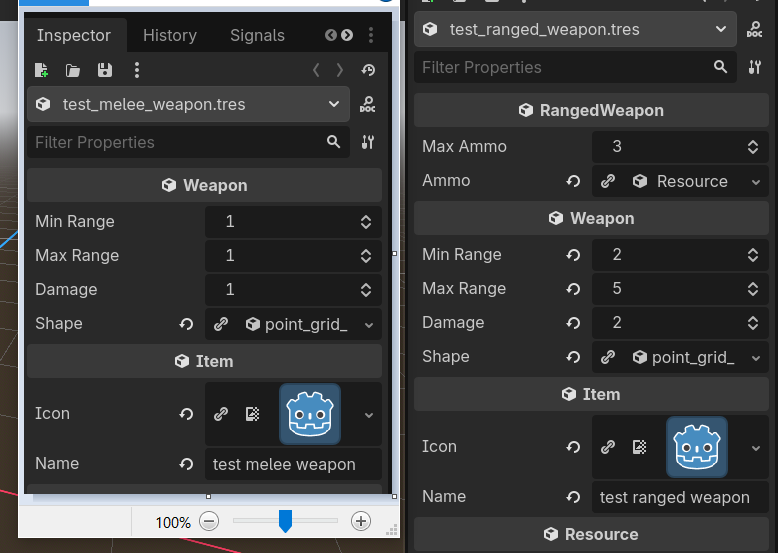
  1. Ok, now we want to compare two Weapons. Inspector can only show you one object at a time, so we open the first one, try real hard to memorize its stats, maybe take a screenshot and paste it into Paint (a real thing I’ve done on many occasions). Now we open the second Weapon in Inspector and try real hard to remember the stats of the first one, maybe compare to your handy Paint backup. Ok, now we want to compare both of these to a third weapon. And then a forth. Etc.

weapon comparison via paint

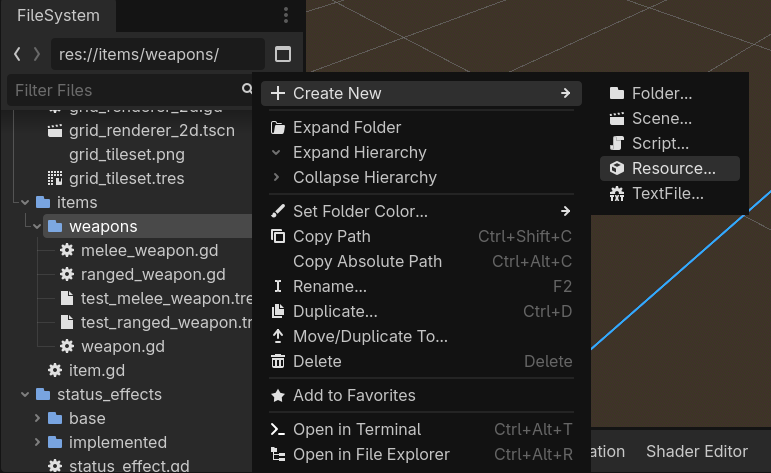
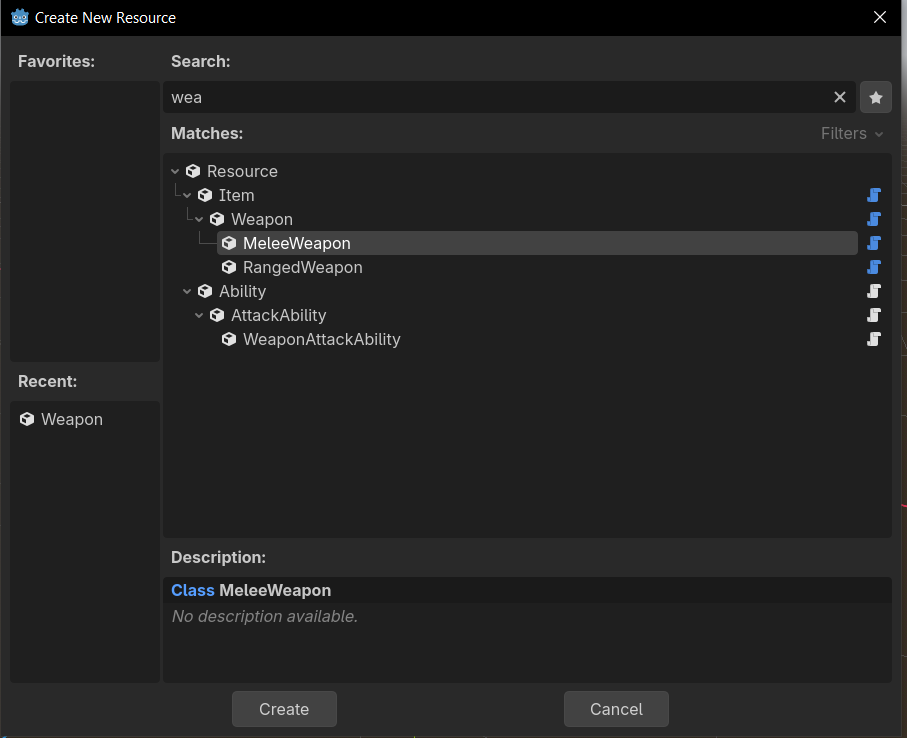
  1. Now we want to make a new Weapon. We once again use the tiny FileSystem window to re-navigate to the correct folder, right click → “Create New” → “Resource…”, find Weapon from the list of every type in the game, come up with a name for the file. Notice you’ve made a typo, rename the file. Start editing. Hmm, what are some good values for our new weapon? I guess we need to compare it to some other ones we already have. See previous point. (Btw this is my RPG project from five years ago, do NOT make separate classes for melee and ranged weapons, polymorphism is a trap, all weapons should just be weapons)

create weapon file system

Now let’s use Modern CSV as an example of a Spreadsheet model, and try the same scenarios.

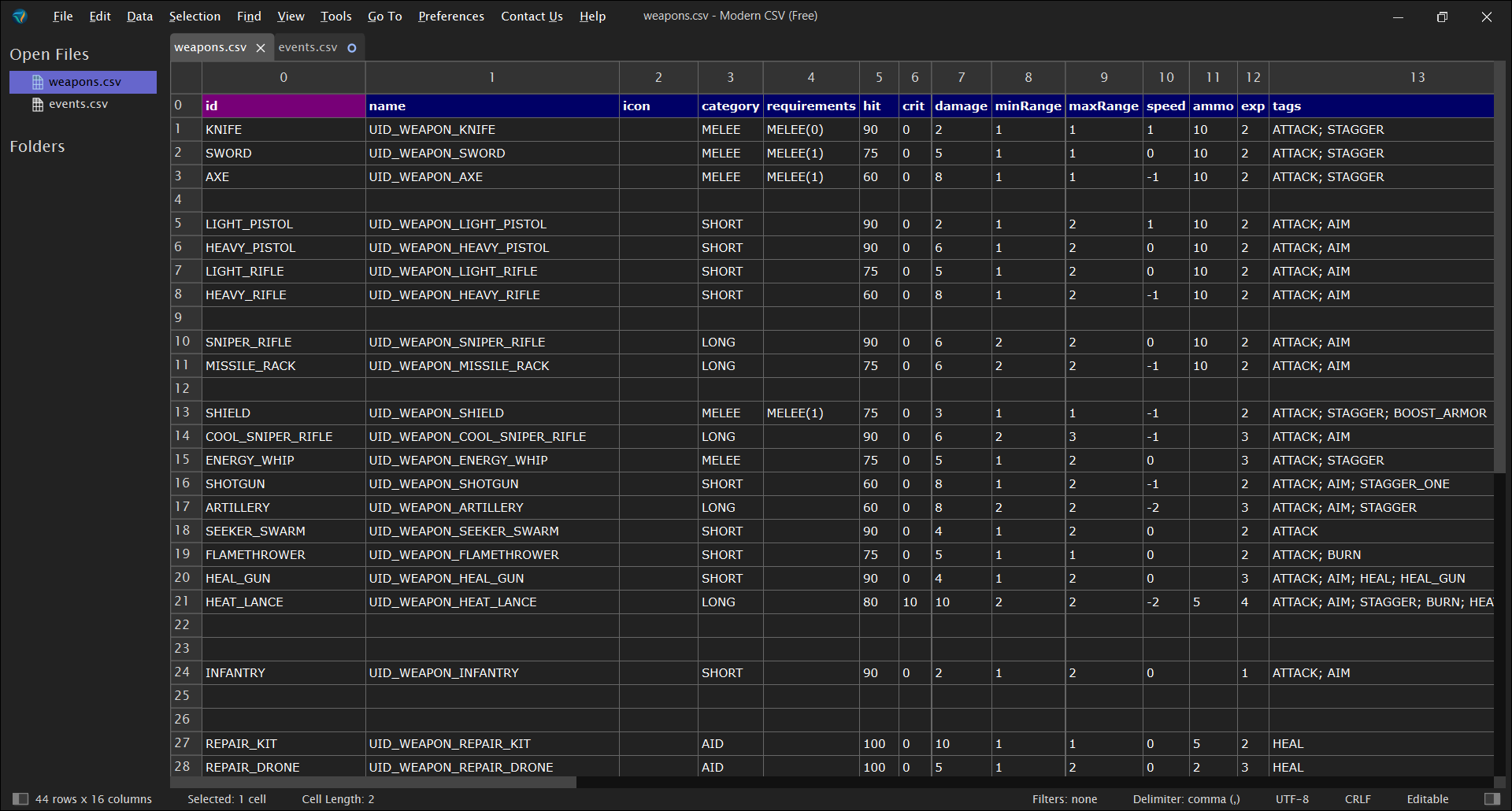
  1. We want to see every Weapon in the game. We open our Weapons spreadsheet. It is full-screen. It is all of the weapons, and only weapons. Once opened, it will live in a tab and won’t disappear if I go to work on Units for a bit.

  2. We want to compare multiple weapons. Well, we can see stats for all of them at once! No Paint required!

  3. Want to make a new weapon? Find roughly where in the table it makes sense for it to be, press Alt+R to insert an empty row, start editing.

It feels so much better to add new stuff to the game this way. It’s so frictionless, it’s literally a joy to use.

I’ve since learned Unreal has its own version of spreadsheets in the form of DataTable-s, but the fact that neither Godot nor Unity has built-in spreadsheet support is baffling to me. Using spreadsheets used to be common practice, and modern engines simply snuffed it out in favor of something, in my opinion, much worse!

Some counter-points I’ve seen for why spreadsheets are The Bad Ones Actually:

  1. One file is harder to version control then separate files

True, however this could be mitigated by storing each row as a separate file under the hood. This would have an added benefit of allowing lazy loading of assets at runtime instead of loading the whole table file at once. I work alone, and my files are not that big, so a single CSV file suits me perfectly fine.

  1. Can’t have inheritance

Yes you can! Just add a Parent column. Unfilled cells inherit value from parent. Filled cells override it.

  1. Can’t in-place modify nested objects

This one, I would argue, is actually a pro, not a con.

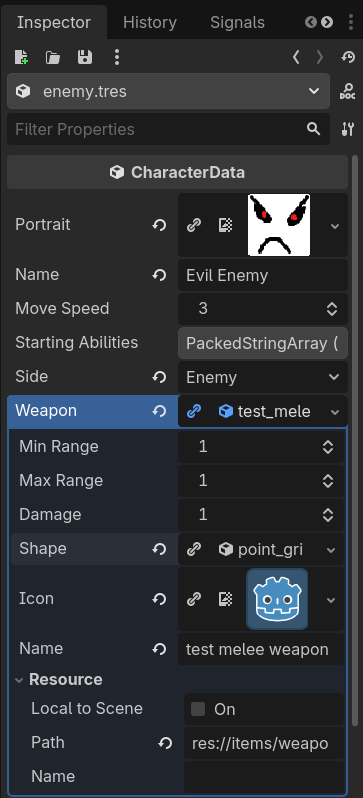
Imagine we have a Unit class, who has a Weapon-type field. In the Inspector model, we can override Weapon parameters from within a Unit.

nested resources

Say, we are working on Space Pirate and need them to have a slightly numerically different Laser Pistol. As we’ve seen, creating new weapons is bit of a pain. But making overrides inside the Space Pirate itself is trivially easy, so we follow the path of least resistance and do just that.

Some time passes, and we are now working on Outlaw Scavenger who we decide needs the same slightly tweaked Laser Pistol. Making new Weapon file is still a pain, it’s much quicker to just copy-paste our overrides, so we do that.

Now, a long time later, we are doing a balance pass and need to rebalance our Modified Laser Pistol. We now need to:

  1. Track down both units with the override (sure hope you copy-pasted those values only between two units! It’s usually more though!);
  2. Finally create the Modified Laser Pistol file with those values (and it’s as much of a drag as you’ve imagined);
  3. Replace the overrides within those units with the new weapon.

This seems entirely preventable, and surely nobody would fall into such an obvious pitfall, but at work I’ve seen this exact scenario play out many times.

The Spreadsheet model, by not allowing you to modify Weapon parameters within the same spreadsheet as Unit’s, prevents something like this from ever happening. You need a new weapon, you make a new weapon, and it’s trivial. Unit data contains only that weapon’s id.

  1. Ok, don’t modify, but you can’t even look at values for nested objects

This one I can kinda agree with, it can be annoying to toggle between Units and Weapons spreadsheets. This could be solved with some form of quick look-up – press on the weapon id, a pop-up shows you the values / takes you to the row in that table.


Being fully converted to the glory of CSV tables, I used them for nearly everything in my game: Units, Items, Status Effects, VFX, Support Links, Terrain Types, Missions, EXP thresholds, Barks, pronouns, localization, etc.

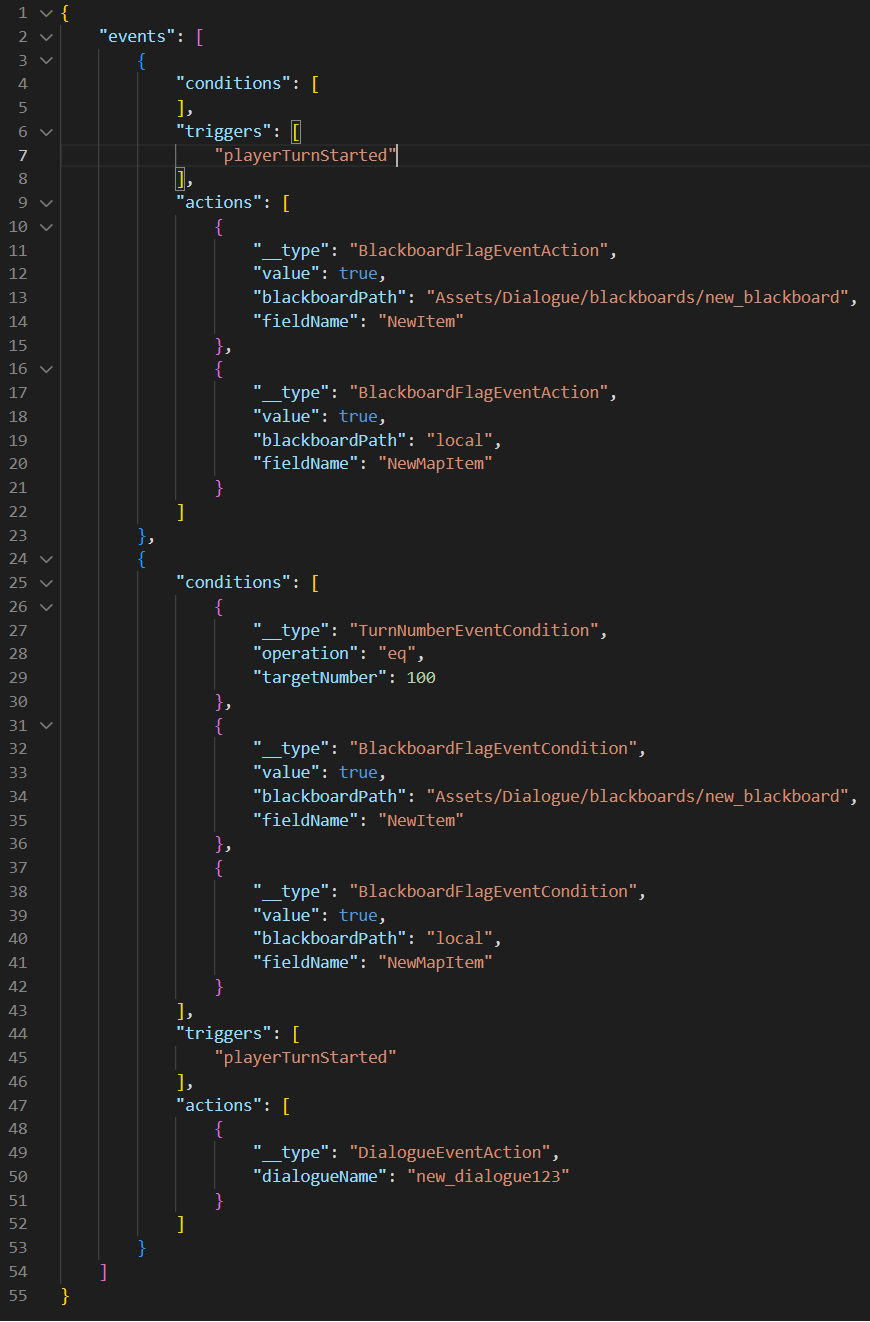
Only thing I (sadly) managed to do with JSON before going full throttle on CSV were in-mission events – on trigger X, if condition Y, do action Z. I had a Condition class, an Action class, and they had a bunch of child classes, and I would write it all out within a JSON file, and it was Bad. Adding a single new event took minutes. Take a look at how much space is taken by two simple events:

I later re-made that system to use CSV files and a super simple scripting language. These are the exact same two events:

Adding an event now takes seconds. AND it is way more readable. Go tables!