After a much-needed few months away from game dev (and binging a lot of indie games), I’m getting back to work. I’ve been doing some tentative design work in spreadsheets for a little while now, and yesterday I started coding. I’m starting with some refactoring work and with my redesign of how stats work (also still tentative).
I’m not 100% settled on what this game will be about yet. I don’t think I’m ready to write a direct sequel to ML1, but I have some prequel ideas. I am also interested in returning to my tech fantasy setting, but a) I don’t have a good name for it or know what story I would want to tell in it, and b) the amount of new art I would have to create for it (especially all the player portraits) is daunting. ML2 makes the most sense right now, I think, so for now I’m moving forward with that in mind.
On the technical/refactoring side, I am starting with Godot 4.6 and am taking the opportunity to clean up and organize a lot of cruft that accumulated in ML1. An example is the workaround I used for enum dictionaries, which were poorly supported in Godot 4.2 when I first migrated from Unity. I scrapped that and replaced it all with basic dictionaries, now that they work better. I’m also making use of more resources to simplify item management. For example, I created an “item category” resource that stores an item’s icon, equipment slot, price modifiers, key status, etc. This way, if I want to e.g. update the icon for all broadswords, I only need to do it in one place. It also makes the item class smaller and easier to handle.
On the design side, I mentioned reworking stats. Stats in ML1 span a range from 3-15, but I didn’t make good use of that granularity. 4, 8, and 12 are the most important values since they are break points for equipment proficiency (itself a design compromise), and the point-by-point decisions in between aren’t super interesting. Even D&D has long had this problem. If you’re playing 3e for example, the only numbers you’re probably looking at when creating a character are 8, 10, 12, 14, and 16. Complication without attendant complexity isn’t really beneficial.
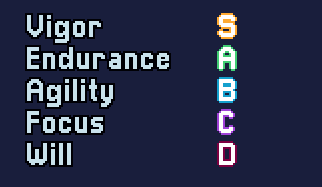
I’m experimenting with condensing the base stat range to ranks E, D, C, B, A, and S, as well as reworking equipment and stat bonuses. Derived stats like attack power will still be numerical. The idea is to put more weight on one stat rank vs. the next, but also to make stat allocation a bit more intuitive, as well as to reduce or eliminate break points that have a major impact on the character and can be hard to fully understand up front. This is still in flux because I’m not sure yet what works and what will best meet my design goals, but I’m getting closer.
While I was at it, though, I couldn’t resist implementing this little glow-up. I’ve also considered using stars (★★★★★) instead of letters for quicker visual clarity, but that takes up a lot more space, I don’t have a good star graphic or unicode ready, and these labels aren’t currently set up for rich text. Options open, though.